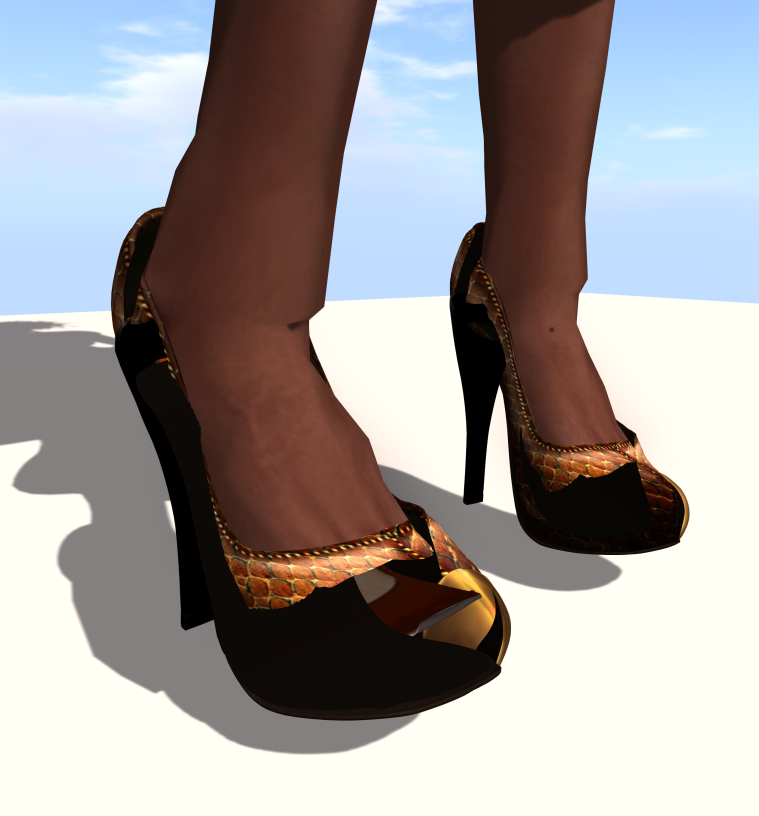
Berry says Aug 24, 2012 04:02PM If I don't put the alpha layer on, they look fine but then I can see my foot.
Elysium Hynes Aug 24, 2012 04:03PM try another layer maybe the shoes have a transparency on them and is clashing with alpha?
Elysium Hynes Aug 24, 2012 04:04PM contact the maker because i think the mesh might have transparency in it and is clashing witht he alpha
Berry says Aug 24, 2012 04:04PM oh, I checked automatic alpha mask under rendering and that fixed it:
Berry says Aug 24, 2012 04:06PM But I've never had to check that before, that always ruins my eyelashes and stuff. Why do I have to do this for these shoes? What's diff?
Berry says Aug 24, 2012 04:06PM They are Kunglers, I love them so much. Been eyeing them on flickr. I think I got them from Vintage Fair.
Cajun 'n Boots Aug 24, 2012 05:29PM i had a shoe that did that and used a diff shoe alpha from a totally diff designer to take that away. but yeah i dunno why it happens
Cyclic Aug 25, 2012 05:03PM Sometimes if you're saving textures for mesh as a png file and the transparency layer is active or checked, it will cause problems like the
Cyclic Aug 25, 2012 05:04PM above - designers can solve this by making sure they either save as a high quality JPG or making sure that the PNG they save has not got any
Berry says Aug 25, 2012 09:18PM It was the PNG TGA file problem. The designer sent me an updated version of the shoe. I've updated my post about it with the all the info.